
Media Tags
Creator support
Edit audio/video tags and cover art locally in the browser.
Pin this app to Home. Open it from Home afterward.
About this app
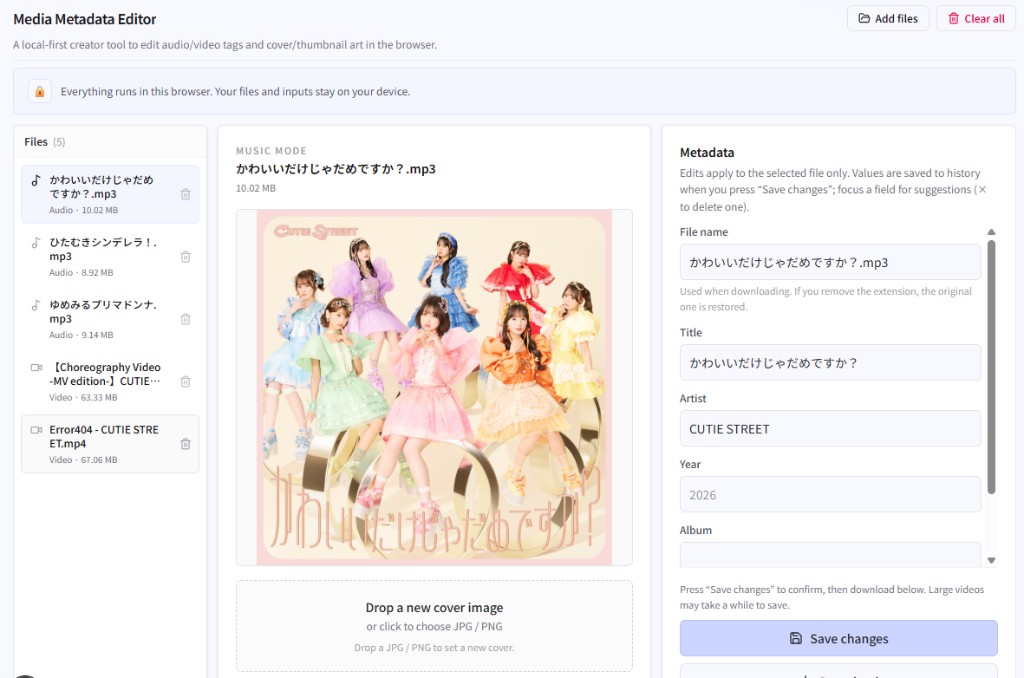
Edit titles, artists, album years, and cover/thumbnails for audio and video in the browser, then download the result back into your library—without uploading files to a server.
Handy for personal media tidy-ups and pre-publish checks. Embedding tags back into the file depends on format—check support before a big batch.
What you can do
- Multi-file lists with audio and video modes
- Title, artist, year, album, and input history
- Replace audio covers; capture video-frame thumbnails
- Save changes, then download tagged files
Getting started
- Drop audio or video files.
- Select a file and edit metadata or artwork.
- Save changes.
- Download the edited file.
Tip
Embedding focuses on MP3 and some video containers; other types may mainly rename. Large videos can take a while to save.
Last updated
May 22, 2026
Compatible devices
- Smartphone
- Tablet
- Windows
- Mac