
Mail Templates
Work efficiency
Speed up email replies with tags and variable substitution.
Pin this app to Home. Open it from Home afterward.
About this app
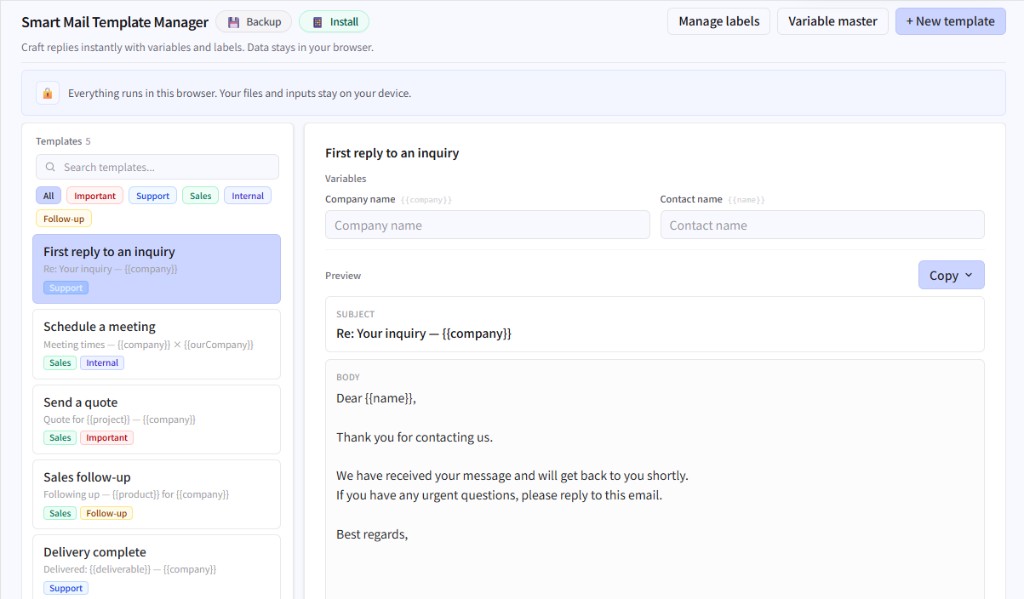
Store subject lines and bodies you reuse, find them with tags, and fill names, dates, or project fields with {{variables}} instead of rewriting every time.
Ideal for routine internal mail, support replies, and follow-ups. Data stays on your device, with backup support.
What you can do
- Template list with search and tag filters, plus variable substitution
- Variable library and colored labels (tags)
- Fill → preview → one-click copy of subject, body, or both
- Starter samples included; input history speeds re-entry
Getting started
- Pick a template from the list, or create a new one.
- Fill the variable fields that match {{placeholders}} in the draft.
- Check subject and body in preview.
- Copy and paste into your usual mail client.
Tip
Copying warns you if variables are still empty. Tag your most-used drafts so they’re easy to find later.
Last updated
August 1, 2026
Compatible devices
- Smartphone
- Tablet
- Windows
- Mac